Thesis: Enterprise RAG on .NET is a system with eight distinct decision surfaces, each with its own failure modes — treating it as prompt-plus-vector-search causes all of them to fail silently. In this core reference architecture, we decompose the "magic" of RAG into a governed engineering discipline suitable for Staff Engineers and Architects building on the Microsoft stack.
Beyond the PoC: The Eight Surfaces of Reality
Most enterprise AI initiatives begin with a deceptive ease. A senior developer wraps a basic PDF parser, calls an OpenAI embedding model, pushes the results to a vector store with default settings, and writes a system prompt that says, "Use the context below to answer the user's question." In a controlled PoC with fifty documents and ten friendly testers, this works. It feels like magic.
Then comes production.
Production is where the document corpus grows to ten million records, where users have varying access rights that must be enforced at the search boundary, where the LLM's latency spikes unpredictably, and where "I don't know" is a better answer than a confident hallucination. In the enterprise, RAG is not a feature; it is an architecture.
The central problem with the current "RAG tutorial" ecosystem is that it encourages a "PoC-first" mindset where retrieval is treated as a black box. If you treat retrieval as a black box, you cannot debug why your system failed to answer a question that it clearly had the data for. You cannot explain why an unauthorized user received a summary of a restricted document. And you certainly cannot optimize for cost or latency.
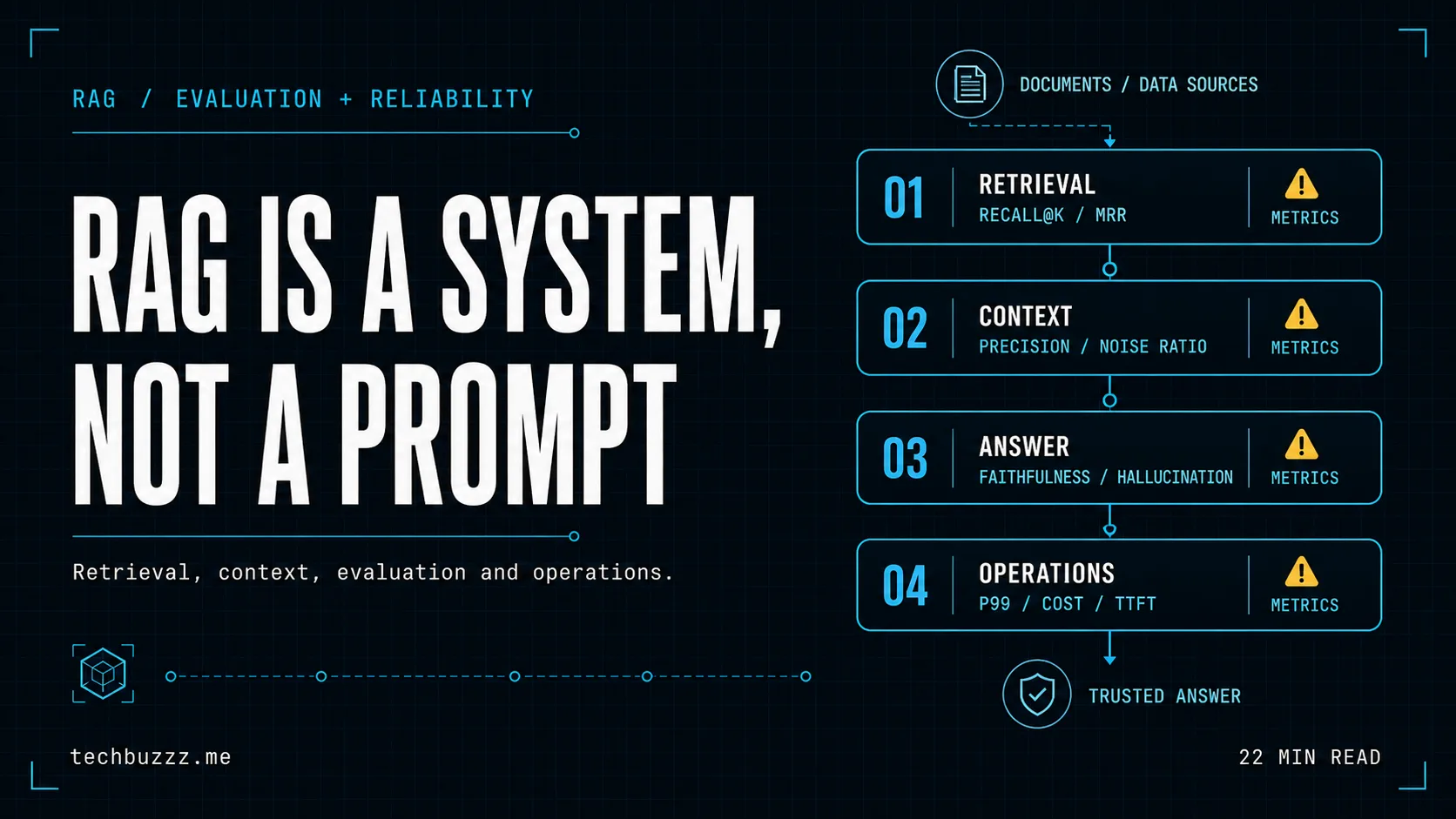
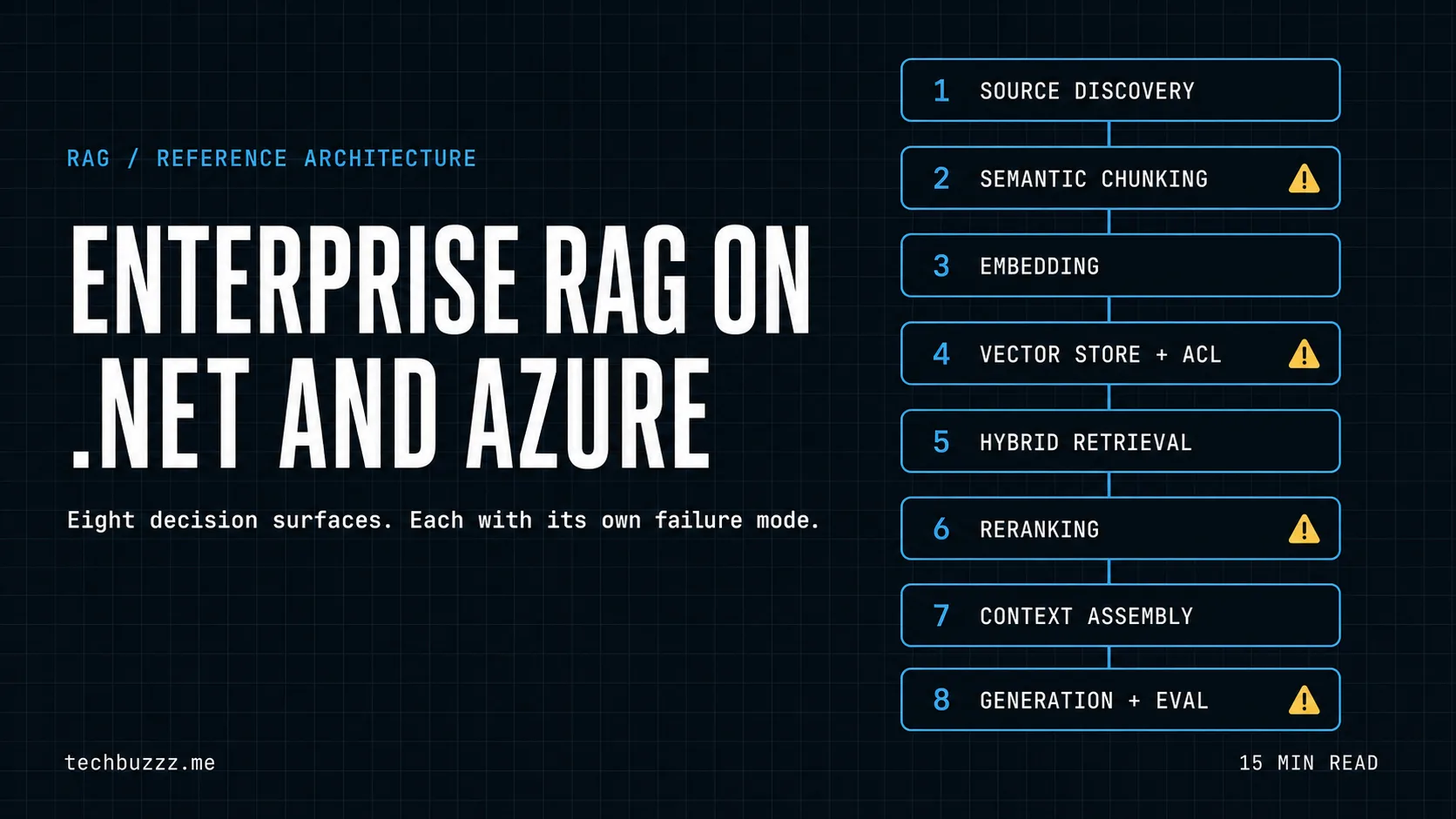
To build a RAG system that survives contact with reality, we must move beyond the "prompt plus search" mental model. We must treat it as a pipeline of eight distinct decision surfaces, each requiring explicit architectural ownership:
- Document Source & Discovery: How we track, synchronize, and handle incremental updates in a living corpus.
- Preprocessing & Semantic Chunking: How we decompose documents into meaning-bearing units without losing structural context.
- Embedding & Vectorization: How we map those meanings into a high-dimensional space appropriate for the domain.
- Indexing & Governance Store: Where we store vectors, metadata, and ACLs for multi-tenant, secure retrieval.
- Multi-Modal Retrieval Strategy: The dance between Vector, Keyword, and Hybrid search to handle both semantic and lexical intent.
- Re-ranking & Noise Reduction: The critical "second pass" that saves the LLM from processing irrelevant noise.
- Context Assembly & Prompt Synthesis: Managing token budgets, citations, and the "lost in the middle" problem.
- Execution, Evaluation & Observability: Production-grade execution with Polly and closing the feedback loop with automated evaluation.
Treating any of these as a default choice is a risk. Treating all of them as defaults is a guaranteed failure. This article provides a comprehensive reference architecture for .NET engineers building on Azure to navigate these surfaces.
Layer 1: The Ingestion Pipeline (The Data Foundation)
In the enterprise, "data" is a polite word for chaos. You are dealing with 400-page legacy PDFs, Word documents with intricate nested tables, and PowerPoint decks where the most important context is buried in an image alt-text. The ingestion pipeline's job is to extract meaning from this chaos while preserving structural integrity.
1.1 Document Discovery and Change Management
An enterprise corpus is rarely static. If you ingest a SharePoint library once, your RAG system is a snapshot of the past. A production-ready ingestion layer needs a "Discovery Service" — often implemented as an Azure Function with a Blob Trigger or a scheduled Logic App — that tracks MD5 hashes of files to handle incremental updates.
When a document changes, you don't just re-ingest it. You must ensure the old chunks are deleted or marked as "stale" in the index. Without this, your LLM will retrieve two versions of the same policy and hallucinate a contradiction.
1.2 The Chunking Decision: Why Length is a Liability
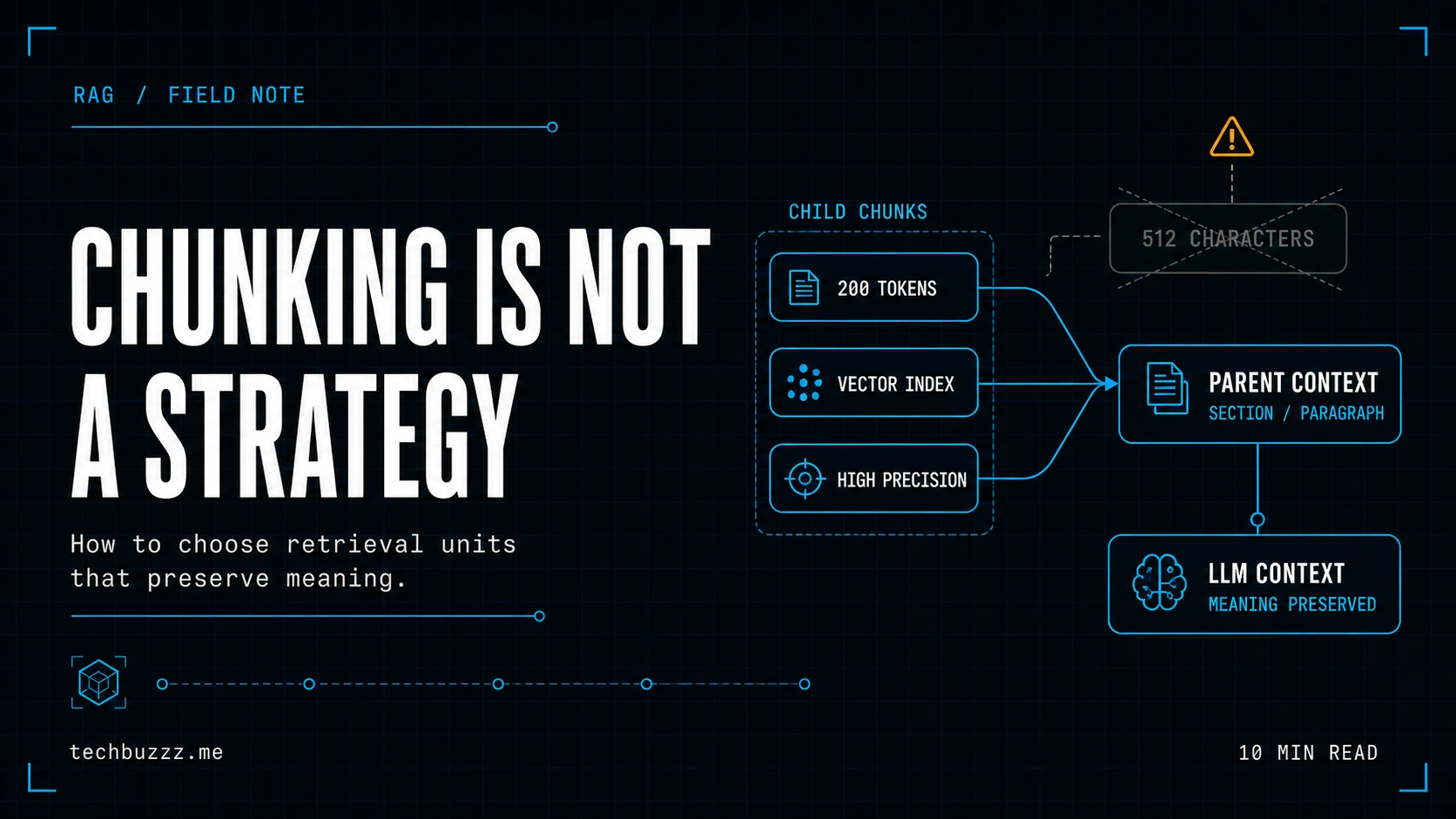
The most common mistake in early RAG builds is fixed-size character chunking (e.g., "split exactly every 1,000 characters with a 100-character overlap"). This approach is a semantic disaster. It chops sentences in half, separates headers from their paragraphs, and renders tables incomprehensible.
For .NET developers, the Semantic Kernel offers some basic text splitters, but for enterprise depth, you should consider:
- Layout-Aware Chunking: Using Azure AI Document Intelligence to identify headers, tables, and sections. A table should almost always be its own retrieval unit, converted to Markdown or JSON to preserve its relational structure for the LLM.
- Semantic Breakpoint Detection: Using a lightweight model (or the
SemanticKernel.Textutilities) to split text where the embedding vector significantly shifts, indicating a change in topic. - Hierarchical Indexing: This is a Staff-level pattern. You store small "child" chunks (sentence-level) for precise vector matching but, once matched, you retrieve the "parent" section for the actual LLM context. This gives you the best of both worlds: precise retrieval and rich context.
1.3 Security at the Edge (ACLs)
Security is an ingestion-time decision. If you store a vector in a database without its associated Access Control List (ACL) metadata, you have built a data leak. At ingestion, you must map the source permissions (e.g., SharePoint Site IDs, AD Group IDs) to the index metadata.
In the Azure AI Search SDK, your index definition should include a Collection(Edm.String) field for allowed_principals. This allows you to enforce security at the retrieval stage, ensuring the LLM never even "sees" documents the user isn't authorized to view.
Layer 2: Vector Store Selection (The Engine Room)
Choosing where to store your vectors is the most consequential performance and cost decision in the architecture. In the Azure and .NET ecosystem, the choice typically narrows to three paths.
2.1 Azure AI Search (Managed Hybrid)
Azure AI Search is the "heavy lifter" of the ecosystem. It isn't just a vector store; it is a full-featured search engine.
- Key Features: Integrated Vectorization (preview), Indexers for Blob/SQL, and the proprietary Semantic Ranker.
- The .NET Experience: Use the
Azure.Search.DocumentsNuGet package. It is highly mature, supports full OData filtering, and handles the complexities of "Hybrid Search" (combining Vector and BM25 keyword results) out of the box.
2.2 Qdrant (The Performance Specialist)
When latency is the primary constraint, or when you are operating at a scale where Azure AI Search's pricing tiers become prohibitive, Qdrant enters the frame. It is a specialized, high-performance vector database written in Rust.
- Trade-offs: You gain extreme control over HNSW (Hierarchical Navigable Small World) parameters and memory-vs-disk trade-offs. However, you lose the "one-click" integration with Azure's identity and data-source stack. You will need to write more glue code in .NET to handle index synchronization and filtering logic.
2.3 pgvector on Azure Database for PostgreSQL
This is the "consistency is king" choice. By using the pgvector extension, you keep your vectors alongside your transactional data.
- Use Case: If your RAG system relies heavily on joining vector results with complex relational metadata (e.g., "Find documents similar to this, but only for customers who have an active Gold subscription and are based in EMEA").
The Decision Rule: Managed vs. Self-Managed
The core trade-off here is Operational Cost vs. Control vs. Latency.
- Operational Cost: Azure AI Search wins. You don't manage shards, RAM allocation, or OS updates.
- Control: Qdrant wins. You can tune the engine for specific hardware or quantization strategies (like Product Quantization) to fit massive indices into smaller memory footprints.
- Latency: For simple vector-only lookups, Qdrant is faster. However, for "Real World Search" where users use keyword-heavy queries ("Policy HR-2024"), Azure AI Search's hybrid mode often provides better relevance latency (the time it takes to get a useful answer).
Artifact: Reference Architecture Layer Diagram
The following diagram illustrates the four operational layers and the flow of data from ingestion through to generation and evaluation.
graph TD
    subgraph "1. Ingestion Pipeline (.NET & Azure Services)"
        A[Sources: SharePoint, SQL, Blob] --> B[Discovery Service: Azure Functions]
        B --> C[Doc Intelligence: Layout Extraction]
        C --> D[Semantic Chunking Engine]
        D --> E[Embedding: text-embedding-3-large]
        E --> F[Storage Controller: .NET SDK]
    end

    subgraph "2. Retrieval Layer (Storage & Governance)"
        F --> G[Azure AI Search: Hybrid Index]
        F --> H[Metadata & ACL Store]
        F --> I[Qdrant: High-Speed Vector DB]
    end

    subgraph "3. Context Assembly (.NET / Semantic Kernel)"
        J[User Query] --> K[Query Expansion: HyDE / Multi-Query]
        K --> L[Search Execution: Hybrid + Filter]
        L --> M[Security Boundary: ACL Enforcement]
        M --> N[Reranking: Semantic Ranker / Cross-Encoder]
        N --> O[Context Window Optimizer]
    end

    subgraph "4. Generation & Evaluation (The Outcome)"
        O --> P[Async LLM Generation: GPT-4o]
        P --> Q[Answer Validation: Logic & Fact Check]
        Q --> R[Observability: App Insights + OpenTelemetry]
        Q --> S[Continuous Evaluation: Ragas / Custom .NET]
    end

    J --> K
    R --> T[Azure Monitor Dashboard]
    S --> T
Layer 3: Context Assembly (The Intelligence Bridge)
In a PoC, finding the top 3 documents and dumping them into a prompt is enough. In the enterprise, this is where quality breaks. You are often retrieving "near-misses" — documents that are semantically similar but factually irrelevant.
3.1 Hybrid Search: The Non-Negotiable
Vector search (Cosine Similarity) is great at finding meaning but terrible at finding specific identifiers. If a user searches for "Error 0x800411", a vector search might return general articles about "Error Handling," while a keyword search (BM25) would find the exact technical note. Hybrid Search is the only way to satisfy both semantic and lexical intent.
3.2 The Power of the Reranker
Retrieval often returns 50+ candidates. Sending all of them to an LLM is expensive, creates noise (reducing "faithfulness"), and can cause the "Lost in the Middle" phenomenon where the LLM ignores information placed in the middle of a long prompt.
A Reranker is a high-accuracy, high-latency model (like a Cross-Encoder) that looks at just the top 50 results and pulls out the 5 most relevant. In my practice, adding a Reranker is the single most effective way to improve RAG quality without changing your LLM. Azure AI Search includes "Semantic Ranking" as a toggle; use it.
Layer 4: Generation, Evaluation, and .NET Execution
This is the layer that faces the user. In a production system, this layer must be built for resilience and measurable quality.
4.1 Resilience with Polly
Every call to an LLM is a call to an unreliable, rate-limited external service. You must wrap your AI calls in Polly resilience policies.
- Wait and Retry: For 429 (Rate Limit) and 503 (Server Busy) errors.
- Circuit Breaker: To stop your service from spinning its wheels when the model is down.
// Implementation Note: Defining a resilience pipeline for Azure OpenAI
var aiResilience = new ResiliencePipelineBuilder()
    .AddRetry(new RetryStrategyOptions {
        MaxRetryAttempts = 3,
        BackoffType = DelayBackoffType.Exponential,
        UseJitter = true
    })
    .AddCircuitBreaker(new CircuitBreakerStrategyOptions {
        FailureRatio = 0.5,
        SamplingDuration = TimeSpan.FromSeconds(60),
        MinimumThroughput = 10
    })
    .Build();

// Wrap your Semantic Kernel or LLM call
await aiResilience.ExecuteAsync(async ct => await _kernel.InvokeAsync(...));
4.2 Structured Logging and Observability
"Black box AI" is the enemy of maintenance. Every RAG execution should emit:
- Correlation ID: To track the query from the UI to the search engine to the LLM.
- Search Scores: What was the confidence of the retrieved chunks?
- Token Usage: How many prompt tokens vs. completion tokens? (Crucial for cost tracking.)
Using Microsoft.Extensions.Logging (ILogger) with structured logging allows you to build App Insights dashboards that answer: "Which documents are most frequently used to answer questions?" and "What is our cost-per-query trend?"
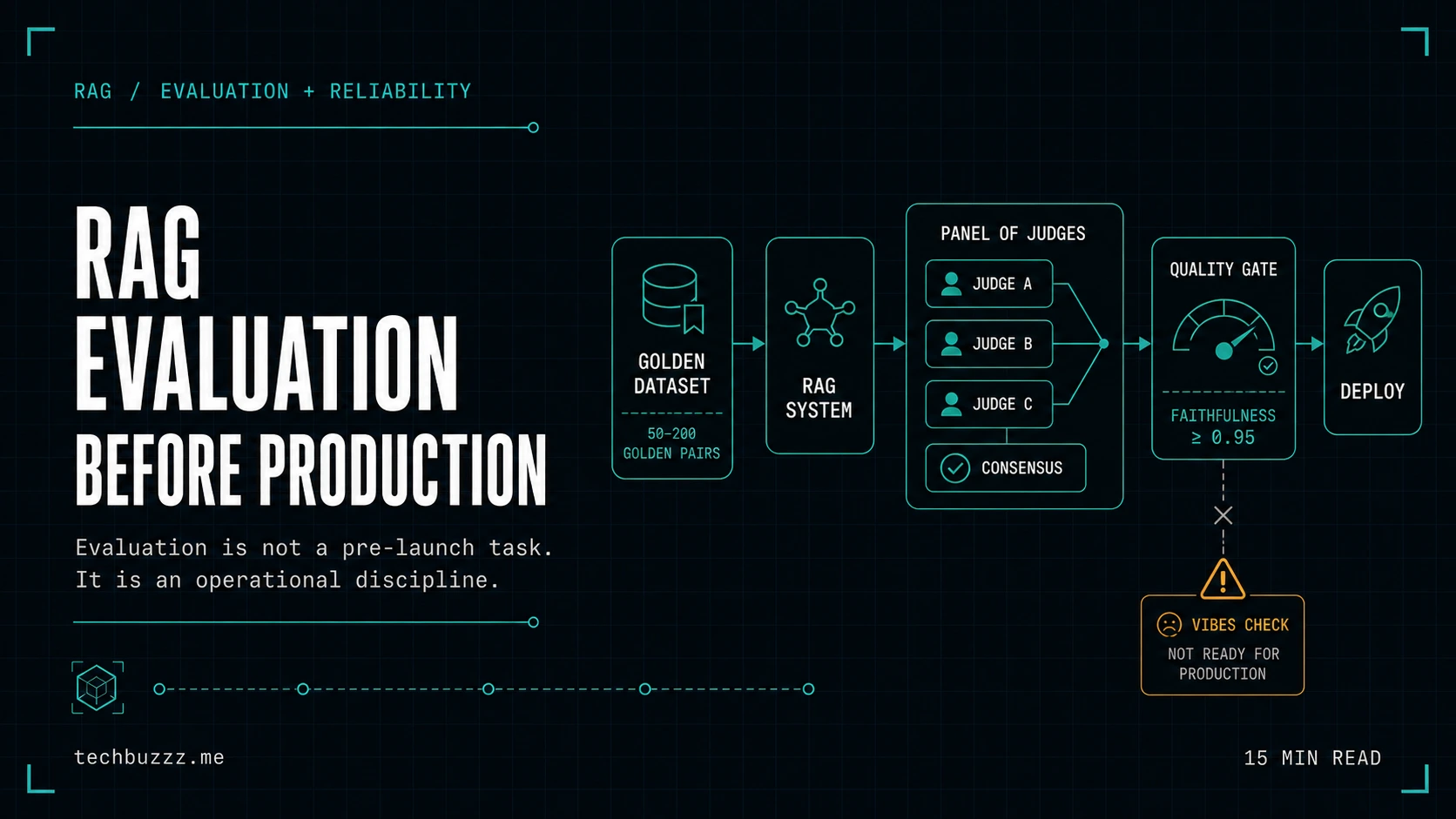
4.3 The Evaluation Loop: RAGAS for .NET
How do you know if your RAG is "good"? Stop asking humans and start using LLM-as-a-judge.
A production system needs an evaluation dataset (Ground Truth) and a pipeline that measures:
- Faithfulness: Does the answer contradict the context?
- Answer Relevance: Does it address the user's intent?
- Context Recall: Did we find all the documents we needed?
Appendix: The Eight Surfaces Failure Matrix
To help you audit your design, here are the primary failure modes for each surface and the architectural mitigations.
| Decision Surface | Primary Failure Mode | Architectural Mitigation |
|---|---|---|
| 1. Source & Discovery | "Stale Context": Retrieval of outdated or deleted document versions. | Hash-based change detection (MD5) and explicit index cleanup on source deletion. |
| 2. Chunking | "Semantic Fragmentation": Breaking concepts across chunks, making them unretrievable. | Layout-aware parsing (e.g. Doc Intelligence) and hierarchical parent/child indexing. |
| 3. Embedding | "Domain Mismatch": The embedding model doesn't understand industry-specific jargon/acronyms. | Use domain-specific embeddings or fine-tuned rerankers to compensate. |
| 4. Storage (Vector Store) | "Data Leakage": Sensitive documents retrieved by unauthorized users. | Ingestion-time ACL synchronization and retrieval-time security filtering. |
| 5. Retrieval Strategy | "Keyword Blindness": Failing to find specific IDs or error codes with pure vector search. | Mandatory Hybrid Search (Vector + BM25 keyword matching). |
| 6. Re-ranking | "Signal Noise": Relevant documents are buried by semantically close but useless noise. | Two-stage retrieval: broad vector search followed by high-precision Cross-Encoder reranking. |
| 7. Context Assembly | "Hallucination by Overload": LLM ignores truth because the prompt is too long or noisy. | Strict token budgeting (Tiktoken) and citation-enforced system instructions. |
| 8. Execution & Eval | "Silent Drift": Answer quality degrades over time as the corpus changes without review. | Automated CI/CD evaluation (Ground Truth testing) and real-time App Insights dashboards. |
Summary: The Staff Engineer's Checklist
If you are reviewing a vendor proposal or an internal RAG design, ask these four questions:
- How is security (ACLs) enforced at the retrieval layer, not just the application layer?
- What is the strategy for re-indexing documents when they change in the source system?
- Where is the Reranker in the retrieval path, and how does it affect cost and latency?
- How are we measuring "ground truth" faithfulness before we ship to production?
Treating RAG as a prompt problem is for hobbyists. Treating it as an eight-surface architectural challenge is for professionals.
Related Articles:
- From AI Demos to Governed Production Systems
- Why "an LLM chatbot" is not an AI architecture
- Project: Agent Shaker — Multi-agent Coordination for .NET
Discuss an enterprise AI architecture or delivery challenge → techbuzzz.me