Field Note
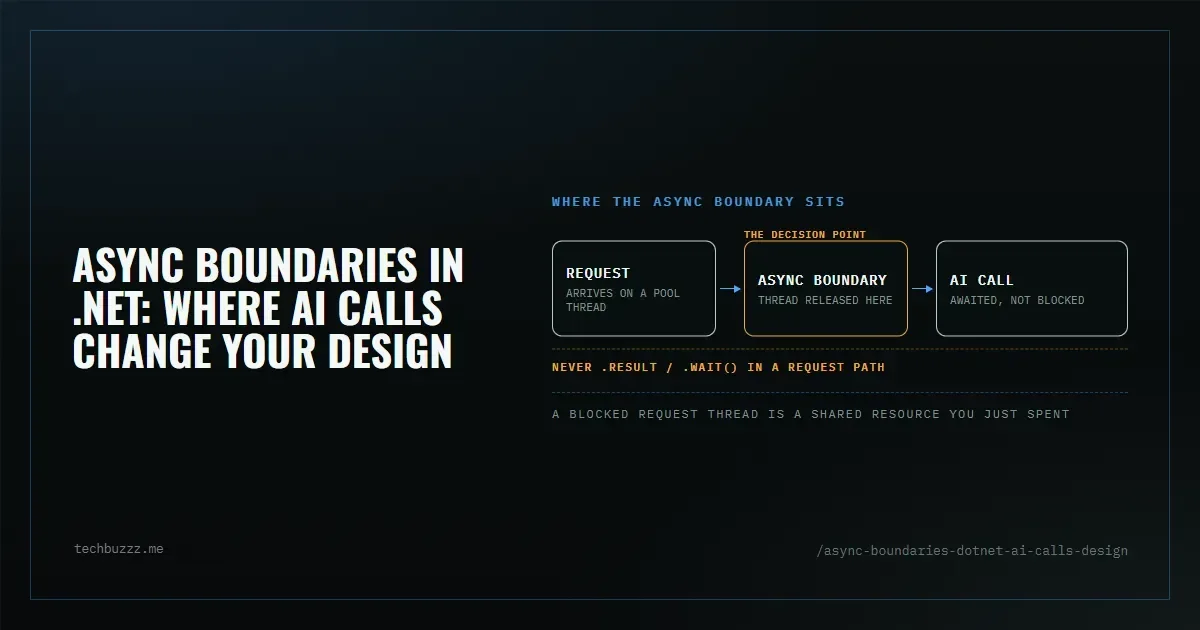
When an AI call enters a .NET request path, the design question is no longer only “is this code asynchronous?” The real question is: where is the async boundary?
An async boundary is the point where execution can stop without blocking a thread and resume later when the awaited work completes. In ASP.NET Core, this matters because request threads are a shared resource. If a controller, service, or integration layer blocks while waiting for an AI response, the app may still function, but it will waste threads and reduce headroom under load.
AI calls are a common place where teams accidentally cross that boundary in the wrong direction. An HTTP request to Azure OpenAI, a vector store query, a tool call through MCP, or a downstream RAG pipeline all introduce latency that should normally be awaited, not blocked on.
Why async boundaries matter
In a typical web request, the CPU work is small and the waiting time dominates. AI integrations amplify this because the system often waits on network I/O, model latency, retries, and streaming responses. If the code treats those waits as synchronous pauses, the runtime threads stay occupied doing nothing useful.
That does not only affect the single request. Under concurrency, blocked request threads can trigger thread starvation symptoms:
- requests begin to queue even though CPU is not fully saturated
- latency increases sharply as traffic rises
- throughput flattens while the process still has free CPU cycles
- logs show timeouts, delayed continuations, or slow health checks
- the app looks “busy” without obvious high CPU usage
These symptoms are often misread as a model problem or a network problem. Sometimes they are. But in .NET they can also point to a design problem: synchronous waiting inside an async-capable path.
When async is mandatory
Use async when the operation waits on I/O and the calling path can naturally continue later.
Typical cases:
- HTTP calls to AI services or embeddings APIs
- database or vector index lookups
- file or blob access
- streaming tokens or SSE responses
- orchestration code that chains multiple I/O steps
In these cases, async is not stylistic. It is part of the contract of the boundary.
When async is not necessary
Async is not automatically required everywhere.
Use synchronous code when:
- the work is purely CPU-bound and very short
- you are doing simple in-memory transforms
- the method is a tiny helper with no I/O and no future need for cancellation or streaming
- the abstraction would become noisier without real benefit
The rule is practical: do not add async just to “match the rest of the stack.” Add it where the operation may suspend.
What changes in design
Once AI is part of the request flow, design around the boundary instead of hiding it.
- Keep controllers thin.
- Push async all the way down to the real I/O.
- Avoid
.Result,.Wait(), andGetAwaiter().GetResult()in request paths. - Propagate
CancellationToken. - Model long-running AI work as an async workflow, not as a blocking helper.
Minimal controller example
Wrong
[ApiController]
[Route("api/chat")]
public class ChatController : ControllerBase
{
    private readonly IChatService _chatService;

    public ChatController(IChatService chatService)
    {
        _chatService = chatService;
    }

    [HttpPost]
    public IActionResult Post(ChatRequest request)
    {
        var response = _chatService.GetReplyAsync(request.Message, CancellationToken.None).Result;
        return Ok(response);
    }
}
This blocks the request thread while waiting for the AI call.
Correct
[ApiController]
[Route("api/chat")]
public class ChatController : ControllerBase
{
    private readonly IChatService _chatService;

    public ChatController(IChatService chatService)
    {
        _chatService = chatService;
    }

    [HttpPost]
    public async Task<IActionResult> Post(ChatRequest request, CancellationToken cancellationToken)
    {
        var response = await _chatService.GetReplyAsync(request.Message, cancellationToken);
        return Ok(response);
    }
}
And the service should match the boundary:
public sealed record ChatRequest(string Message);

public interface IChatService
{
    Task<string> GetReplyAsync(string message, CancellationToken cancellationToken);
}
A practical checklist
- Does this method wait on network, storage, or model inference?
- Can the caller afford to be suspended instead of blocked?
- Am I inside ASP.NET Core request handling or background orchestration?
- Are there any hidden sync calls inside an otherwise async chain?
- Is cancellation propagated from the top?
If the answer is yes to waiting and yes to suspension, the boundary should be async.
Design consequence for AI systems
AI work is often multi-step: retrieve context, build a prompt, call the model, post-process, maybe call a tool, then persist the result. Each step can cross a boundary. The important part is not to flatten those steps into one blocking method “for convenience.” That usually creates the exact shape that fails under load.
A small amount of async discipline early is cheaper than debugging starvation later.
Sources
- Debug ThreadPool starvation — Microsoft Learn — starvation symptoms and the sync-over-async stack trace
- Use IHttpClientFactory to implement resilient HTTP requests — Microsoft Learn
If your .NET app now includes AI calls, review the request path and mark every real I/O boundary explicitly. That is usually where the design needs to change first.